
 EDUCATION ORDERS 1-877-290-8256
Customer Support 1-866-543-9666
Starry Night Moon Exploration Widget
DOWNLOADING AND INSTALLING
Currently available on Mac OS X
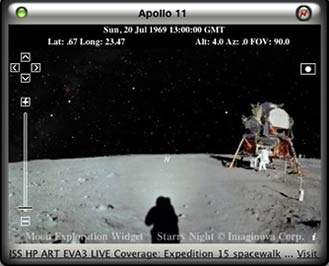

Description
View the sky from anywhere on the Moon, for any date, including presets for 11 Apollo mission sites. Each mission site shows a real photographic panorama, and the sky as it would have appeared on that date. Hover above and explore craters and other features.
Downloading and Installing
Download the Starry Night Moon Exploration Widget
Mac OS X 10.4 Tiger is required. If you are using Safari, click the download link. When the widget download is complete, show Dashboard (Press F12 key), click the Plus sign to display the Widget Bar and click the widget𠏋 icon in the Widget Bar to open it.
If you’re using a browser other than Safari, click the download link. When the widget download is complete, unarchive it and place it in /Library/Widgets/ in your home folder. Show Dashboard, click the Plus sign to display the Widget Bar and click the widget𠏋 icon in the Widget Bar to open it.
Additional Instructions
Starry Night Moon Exploration Widget Shortcuts
- Use the cursor keys on your keyboard to move up, down, left and right
- Press N to face north, S for south, E for East and W for west